Notion vs Obsidian vs Motion in 2026: Which Productivity App Should You Actually Use?
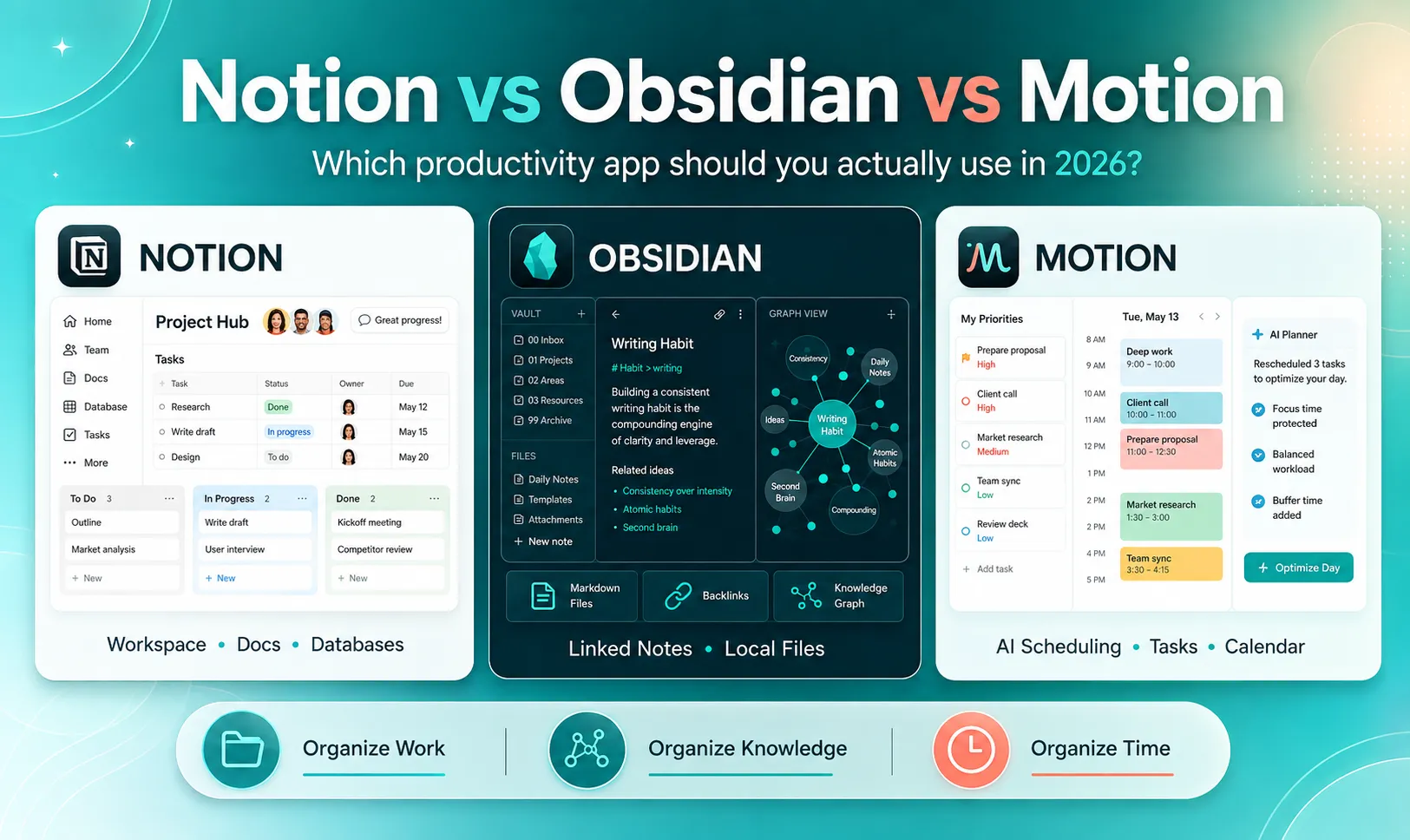
Productivity software has a strange problem: the more tools you install to become productive, the more time you can end up spending managing the tools themselves. Notion, Obsidian, and Motion are often mentioned in the same conversations about productivity, personal knowledge management, and “second brain” systems. But treating them as direct competitors can be misleading. They solve three different problems. Notion is primarily a connected workspace for documents, databases, projects, team knowledge, and increasingly AI-powered work. Obsidian is built around local files, linked notes, long-term knowledge ownership, and a highly customizable personal knowledge system. Motion focuses much more heavily on execution: turning tasks, priorities, deadlines, meetings, and available time into an automatically managed schedule. So the real question is not: Which app is the best? It is: Which part of your workflow is currently failing? If information is scattered across a team, Notion may solve the problem. If your notes are trapped inside platforms you do not fully control, Obsidian may make more sense. If you already know what you need to do but constantly fail to find time to do it, Motion addresses a different bottleneck entirely. This guide compares all three from that perspective. Quick Answer: Notion vs Obsidian vs Motion Tool Best For Core Strength Main Trade-Off Notion Teams, projects, wikis and structured workspaces Documents + databases + collaboration + AI Can become complex as a workspace grows Obsidian Writers, researchers, developers and personal knowledge management Local Markdown files and linked knowledge Requires more setup for collaborative workflows Motion Busy professionals and teams with overloaded calendars AI task scheduling and automatic time blocking Less focused on deep personal knowledge management The easiest way to think about them is: Notion organizes work. Obsidian organizes knowledge. Motion organizes time. There is overlap, but that distinction explains most of the differences between the three. What Changed by 2026? Some older Notion vs. Obsidian comparisons are already outdated. Notion is no longer simply a cloud note-taking application. Its current product includes databases, project management, Notion Calendar, AI-powered search, AI agents, meeting notes, Research Mode, and integrations with external workplace tools. Full Notion AI capabilities are primarily included with Business and Enterprise plans, while Free and Plus users receive limited trial access. Notion also introduced a genuine offline mode in 2025. Users can download pages for offline access on desktop and mobile, while paid plans can automatically make recent and favorite pages available offline. Obsidian has also evolved. It still stores your knowledge primarily as local Markdown files, but the introduction of Bases gives users native database-style views without requiring a third-party Dataview setup for every structured workflow. Bases can create tables, filters, formulas, lists, and other views while keeping the underlying information inside local files. Motion has expanded in the opposite direction. It started with a strong reputation for AI scheduling, but its current product also includes project and task management, calendar and meeting tools, AI Docs, Wiki and Notes, dashboards, and planning features. That makes a 2026 comparison considerably more interesting than it was a few years ago. 1. Notion: Best for Building a Shared Operating System Notion works well when different types of information need to live together. A single workspace can contain: project databases; company documentation; meeting notes; content calendars; client records; product roadmaps; task boards; internal wikis; research pages. That flexibility is still one of Notion's biggest advantages. A content team, for example, could build a database containing every article being produced. Each article could have properties for its writer, deadline, status, target keyword, publication date, campaign and related client. That database could then be displayed as a table for editors, a calendar for publishing, and a board grouped by production status. The underlying information stays connected. Where Notion Becomes More Powerful The biggest change is that Notion increasingly combines the workspace with AI. Notion AI can search information from the workspace and connected services, answer questions using that context, generate reports, summarize information and help work with databases. Its Enterprise Search can also pull context from supported external services such as Slack, Google Drive, GitHub and Jira while respecting existing permissions. This changes how a large workspace can be used. Instead of remembering exactly where a document was stored, a team member can increasingly ask a question. For example: What decisions did we make about the mobile redesign last month? If the relevant information exists across meeting notes, project pages and connected sources, AI-powered search can help surface it. That is a very different experience from navigating manually through dozens of folders. Notion Offline Is Better Than It Used to Be One outdated criticism of Notion is that it is unusable without an internet connection. That is no longer accurate. Notion now lets users download pages on desktop and mobile for offline use. Some functionality still naturally depends on cloud services, and Obsidian remains much more fundamentally local-first, but Notion's offline limitations are significantly smaller than they were several years ago. (Notion) Where Notion Can Become Difficult Notion's flexibility is also its biggest weakness. It is surprisingly easy to spend hours building: complicated dashboards; dozens of database properties; elaborate templates; multiple views of the same information; automations nobody actually needs. At that point, maintaining the productivity system becomes another job. For a small team, the better Notion workspace is often not the most sophisticated one. It is the one people actually keep updated. Notion makes the most sense for: Startups, agencies, marketing teams, operations teams, project managers and anyone who wants documents, databases and collaboration inside one environment. 2. Obsidian: Best for Owning and Connecting Your Knowledge Obsidian takes almost the opposite approach. Instead of beginning with a shared cloud workspace, it begins with files on your device. Your notes are stored locally, and the core format is Markdown. Obsidian states that your local data is not sent to its servers unless you choose optional services such as Obsidian Sync or Publish. The company also says the core application can be used without creating an account. (Obsidian) That has an important long-term consequence. Your notes are not fundamentally dependent on a proprietary database format. A Markdown file created today remains a normal text-based document you can access outside Obsidian. For someone building a knowledge archive expected to last for years, that is a meaningful difference. Why Backlinks Matter The defining Obsidian workflow is not really folders. It is links. Imagine you are researching artificial intelligence. You create notes about: Large Language Models Transformers Attention Mechanisms OpenAI AI Agents Rather than deciding that each note belongs in exactly one hierarchy, you can link concepts directly to one another. Over time, these connections create a network of knowledge. Obsidian's Graph View can visualize those relationships, while backlinks let you see which other notes point to the page you are currently reading. This approach is particularly useful for research because ideas rarely fit neatly into one folder. A note about AI agents might simultaneously relate to: LLMs; automation; software engineering; productivity; business workflows. Linked knowledge handles that naturally. Obsidian Bases Changes the Database Story Older comparisons frequently argued that Obsidian was excellent for notes but poor for structured databases unless you installed community plugins. That is less accurate in 2026. Obsidian introduced Bases as a core feature. Bases lets users turn collections of notes into database-like views while keeping the actual data inside local Markdown files and YAML properties. Users can filter information, create formulas, group records and display content using structured views. Suppose every book note contains properties such as: author: status: rating: date-finished: topic: A Base can turn those notes into something resembling a reading database without moving the information into a proprietary database. That gives Obsidian a useful middle ground between free-form notes and structured data. What About AI in Obsidian? This is one of the clearest differences from Notion. Obsidian's core identity is not built around a centralized cloud AI assistant. Instead, its plugin ecosystem allows users to connect different AI tools or build AI workflows around their vaults. That approach offers flexibility, but it requires more configuration. For privacy-conscious users, developers and technical users, this can actually be attractive because they can decide which model or service interacts with their notes. For someone who simply wants to click an AI button and immediately query an entire company knowledge base, Notion provides a more integrated experience. Where Obsidian Becomes Difficult Customization can become a distraction here too. It is possible to spend an entire weekend: testing themes; creating templates; modifying CSS; configuring hotkeys; installing plugins; designing metadata systems; rebuilding someone else's “perfect second brain.” None of that automatically produces better knowledge. A simple vault containing useful notes and meaningful links can be more valuable than a technically impressive system nobody wants to maintain. Obsidian makes the most sense for: Researchers, students, developers, writers, academics and people who care strongly about local files, long-term access and building a personal body of knowledge. 3. Motion: Best When Your Problem Is Actually Time Motion belongs in this comparison because many productivity problems are incorrectly treated as organization problems. You may already know: what projects you have; which tasks matter; when the deadline is; what documentation you need. The problem is that none of those systems tell you exactly when you are going to do the work. That is Motion's territory. Motion's AI Calendar is designed to combine tasks with your available working time and automatically schedule them. When priorities, deadlines or calendar events change, tasks can be reorganized rather than simply remaining on a static to-do list. Consider a simple example. It is Monday morning and you have: a 90-minute report; a 30-minute client follow-up; two hours of research; three meetings; a presentation due Wednesday. A traditional task manager tells you that these tasks exist. A calendar tells you where your meetings are. Motion attempts to combine both. The idea is to turn available time into an execution plan. Why Auto-Scheduling Can Be Useful Static to-do lists have a hidden problem. They rarely account for time. You can create 14 tasks for tomorrow without noticing that completing them would require 11 hours. A scheduling system forces the workload into the limited number of hours that actually exist. Motion can take information such as deadlines, priorities and task duration into account when planning work. Its task-management system can then reschedule tasks as circumstances change. That can reduce a common productivity behavior: Repeatedly opening a task manager and asking: “What should I work on now?” Motion Is No Longer Just a Calendar Another outdated description is that Motion is simply a smart calendar with very basic notes. Its 2026 product has become significantly broader. The current Pro AI offering includes AI Projects & Tasks, AI Calendar & Meetings, AI Docs, Wiki & Notes, an AI Task Planner and other AI tools. Motion's Business AI plan adds capabilities such as capacity planning, advanced dashboards, Gantt-style timelines, time tracking and permission controls. So Motion is increasingly competing for a larger part of the work-management stack. Its identity, however, is still different from Notion and Obsidian. The strongest reason to use Motion remains execution and scheduling, not building a decades-long personal knowledge archive. Notion vs Obsidian vs Motion: Feature Comparison Feature Notion Obsidian Motion Main philosophy Connected workspace Local knowledge system AI execution system Documents Excellent Excellent Good Structured databases Excellent Very Good with Bases Project-focused Team collaboration Excellent Limited compared with Notion Very Good Local file ownership Limited Excellent Limited Offline use Good Excellent Cloud-oriented Backlinks / knowledge graph Good Excellent Limited AI workspace search Excellent on supported plans Mainly plugin/external-tool based Good Project management Excellent Customizable Excellent Automatic task scheduling Limited compared with Motion Requires custom setup Excellent Calendar focus Good Limited Excellent Customization Very Good Excellent Moderate Best for long-term PKM Good Excellent Limited Best for company wiki Excellent Possible Good Best for scheduling work Good Limited Excellent Notice that the comparison does not produce one universal winner. It reveals three different priorities. Three Real-World Scenarios Scenario 1: You Are Building a Personal “Second Brain” Imagine you are a developer or researcher who collects technical papers, ideas, code references, book notes and long-term research. You want the system to remain accessible even if you stop paying for software five years from now. In this situation, Obsidian's local Markdown architecture is compelling. You can create links between concepts, use properties to structure information and use Bases when you need database-like views. Notion can also build an excellent personal knowledge base, particularly if you value database interfaces and integrated AI. But the underlying philosophy is different. Obsidian starts with ownership of files. Notion starts with an integrated workspace. Scenario 2: You Manage a Content or Product Team Imagine a six-person content team. You need: article briefs; keyword research; writer assignments; due dates; editorial status; campaign documentation; meeting notes; publication calendars. This is where Notion becomes particularly attractive. The same content database can connect documents, projects and team workflows while maintaining a shared source of truth. Obsidian can technically reproduce parts of this setup, but team collaboration is not its central strength. Motion can manage tasks and schedules effectively, but Notion provides a stronger environment for storing the contextual information surrounding those tasks. Scenario 3: You Have Too Much Work and Too Little Time Imagine you already use Google Calendar and a task manager. Your documents are organized. Your projects are documented. Yet every morning you still spend 20 minutes deciding what to do first. Your calendar becomes crowded. Tasks keep moving to tomorrow. In that case, migrating every document into a new PKM system probably will not solve the real problem. Motion addresses the execution layer directly. Instead of creating another place to store tasks, it attempts to allocate time for doing them. That is a fundamentally different value proposition. The Better Strategy: Do Not Force One App to Do Everything One of the biggest productivity mistakes is trying to find a single application that perfectly handles: notes, research, documents, project management, calendars, tasks, AI, meetings, writing and long-term archives. That usually leads to complicated systems. A cleaner approach is to think in three layers. Layer 1: Knowledge Use a tool such as Obsidian when long-term notes, research and ownership matter most. Layer 2: Operations Use a tool such as Notion when shared processes, projects, databases and documentation need to stay connected. Layer 3: Execution Use Motion when tasks need to become actual blocks of time on a calendar. You do not necessarily need all three. But thinking in layers prevents you from judging the wrong product against the wrong requirement. Pricing in 2026 Pricing changes frequently, so always check the official pricing pages before subscribing. At the time of this update, Notion lists a Free plan, Plus at $10 per member per month, and Business at $20 per member per month on its displayed annual-price structure. Full Notion AI functionality is concentrated in Business and Enterprise, while lower plans receive limited trial access. (Notion) Obsidian's core application remains free. Optional Obsidian Sync is currently listed from $4 per user per month when billed annually, while Publish starts at $8 per site per month when billed annually. Commercial use of the core application does not require purchasing a commercial license. (Obsidian) Motion currently lists Pro AI at $19 per seat per month and Business AI at $29 per seat per month on its pricing page, with the available billing option affecting final cost. (Motion) Do not choose purely on subscription price. A cheaper productivity app that creates additional administration can cost more in time than a more expensive tool that removes repetitive planning. Which One Should You Choose? Choose Notion if… Your main problem is fragmented information. You want documents, projects, databases, meetings and team knowledge inside one connected workspace. It is especially suitable for agencies, startups, remote teams, marketing departments and operations-heavy businesses. Choose Obsidian if… Your main priority is building knowledge you fully control. You want local files, Markdown, strong linking, offline reliability and extensive customization. It is particularly compelling for researchers, developers, writers, students and long-term note takers. Choose Motion if… Your information is already organized but your time is not. You want a system that turns tasks and deadlines into an actual schedule and automatically reorganizes that schedule when plans change. It is especially useful for people who constantly carry more tasks than they can realistically fit into a day. The Most Important Question Before Switching Before migrating hundreds of notes into a new productivity application, ask: What specific problem am I trying to solve? If you cannot answer that question clearly, switching tools may simply move the same productivity problem into a different interface. Do not migrate to Obsidian because its graph looks impressive. Do not build a Notion dashboard because someone on YouTube has a beautiful template. Do not subscribe to Motion because “AI scheduling” sounds productive. Identify the friction first. Then choose the tool designed to remove it. Final Verdict Notion, Obsidian and Motion represent three different philosophies of productivity. Notion asks: Where does our work live? Obsidian asks: How is my knowledge connected? Motion asks: When am I actually going to do this? For collaborative teams, Notion remains one of the most complete options for combining structured data, documents, project work and increasingly powerful AI. For long-term personal knowledge management, Obsidian's local-file architecture, Markdown foundation, backlinks and expanding native tools such as Bases make it particularly compelling. For people whose biggest challenge is turning an overloaded task list into a realistic day, Motion offers something fundamentally different through automatic scheduling. The most productive system may not be the app with the longest feature list. It is the one that removes the bottleneck you encounter every day. And for some people, the best answer may be a combination: Obsidian for thinking. Notion for collaborating. Motion for executing. Frequently Asked Questions Is Obsidian better than Notion for a second brain? Obsidian is particularly well suited to long-term personal knowledge management because notes remain local Markdown files and can be connected extensively through links and backlinks. Notion can still build a strong second-brain system, especially for people who prefer visual databases, structured properties and built-in AI. The biggest difference is philosophy: Obsidian emphasizes local ownership, while Notion emphasizes an integrated workspace. Does Notion work offline in 2026? Yes. Notion introduced offline mode in 2025. Pages can be downloaded for use without an internet connection through its desktop and mobile apps, although some cloud and AI functionality naturally still requires connectivity. Does Obsidian require Dataview to create databases? No. Obsidian now includes Bases, a core plugin for creating structured database-like views using information stored in local Markdown files and properties. Dataview remains useful for advanced community-driven workflows, but it is no longer the only obvious path to structured views. Is Motion a replacement for Notion? Not completely. There is increasing overlap because Motion now includes projects, AI docs and knowledge-management features. However, Motion remains strongly centered on planning and scheduling work, while Notion remains stronger as a flexible documentation, database and shared workspace platform. Can I use Notion and Obsidian together? Yes. Some users keep personal research and permanent knowledge inside Obsidian while using Notion for collaborative work, projects and shared documentation. The downside is maintaining information across two systems, so each tool should have a clearly defined role. Is Motion worth using if I already have Google Calendar? It depends on what you expect from your calendar. Google Calendar is excellent for displaying scheduled events. Motion's main proposition is different: it attempts to automatically fit tasks into available time and reorganize them as priorities or schedules change. If manually deciding when to complete tasks is already easy for you, that automation may provide less value.
Novelpack